SUBSCRIBE TO CRITERIONS ALERTS WITH YOUR EMAIL ADDRESS

SUBSCRIBE TO CRITERIONS ALERTS WITH YOUR EMAIL ADDRESS

Tuesday, March 11, 2014

ICD-10 ALERT FOR ALL CRITERIONS AND TCMS CLIENTS

ICD-10 Impact and Strategies
For Criterions and TCMS Clients

Introduction

The mandated transition from ICD-9 to ICD-10 is October 1, 2014. The changes in coding and preparation are not optional and will vary by the type of health care your office provides.

The ICD-10 transition is not a simple update of the ICD-9 code set. The ICD-10 code sets have fundamental changes in structure and concepts that make them very different from ICD-9. Because of these differences, it is important to develop a preliminary understanding of the changes from ICD-9 to ICD-10.

The goal of this document is to help clarify concerns of the ICD10 transition and the use of our software.

Important Notes

Clearinghouses

Criterions will only test and support ICD-10 transmissions with Emdeon and with MedXpress.


Contents

CHAPTER 1 - Challenges in Coding

ICD-10 coding provides better data for analysis of patterns related to disease and treatment outcomes. Claim submission processing is projected to improve because claims become easier for the payers to understand and gauge utilization.

Still, the journey towards these improvements leaves little to no doubt that this transition will result in substantial coding challenges due to significant changes in code structure, coding rules, code detail, and the definition of codes. And, the most glaring change is in the pure number of diagnosis codes now available: There are approximately14, 000 ICD-9 codes… there are about 68,000 ICD-10 codes.

Diagnosis coding has always represented a “necessary evil” for most physicians. Codes are not used, for example, in communication with a patient or their condition. But, it is an important task that ensures payments. Coding is typically assigned to office staff that identifies the correct codes from those stored in TCMS and uses them to submit claims to the various payers. If there is an operational disconnect between the physician and the coder, the quality of the coding suffers and results in inaccurate and possibly unpaid claims.

Improved Coding Accuracy

It is important to avoid fearing that ICD-10 will cause more trouble that it is worth. ICD-10 offers improvements over ICD-9 in defining the patient’s condition. With a better alignment between physician documentation and coding processes, the accuracy and efficiency of claim processing can be greatly improved under ICD-10.

For example, ICD-9 codes today offer only one code for amputation of finger. With ICD-10, there are 32 codes that define which finger, the level and the approach. An amputation of the tip of the small finger, for example, requires minimal treatment and minimal risk to disability. However, an amputation through the mid portion of the index finger requires removal of the rest of the index and metacarpal and a reconstruction to convert it into a functioning index finger. This type of amputation requires high surgical involvement and is at risk for long term disability. With ICD-9, you cannot tell the difference, but with ICD-10 the level of detail outlines the severity and risk of the amputation.
The migration to ICD-10 will require changes in documentation and coding practices… or it will simply become a burden to you with little benefit.

Documentation Key Points to Consider

  • Regardless of when the claim is submitted, ICD-10 codes are only to be used for service(s) provided on or after October 1, 2014. 
  • The code set has been expanded from five to seven positions. The codes use alphanumeric characters in all positions, not just the first position.
  • The new code set increases the specifics of the reporting, allowing for more information to be communicated within the code.  It also allows for future expansion and definitions.
  • Most of the new concepts in ICD-10 coding are concepts that any physician is already documenting now. They understand the significance in understanding severity, risk and a variety of other important parameters related to proper health assessment and treatment.
  • There are codes that are a combination of diagnoses and symptoms, so fewer codes may be needed to report or describe a condition.
  • ICD-10 codes enable lateral reporting (right vs. left) reflecting which side of the body or limb is subject to evaluation. About 25,000 (36%) of the new codes are different only because they distinguish “right” vs. “left.”  You can also report location such as medial, distal or proximal.
  • Requirements are different for all specialties. For example, Ophthalmology codes have changed very little in scope, but codes for musculoskeletal systems have increased dramatically… over 50% of the ICD-10 codes are related to musculoskeletal conditions. Over 17,000 ICD-10 codes (about 25%) are related to fractures.
  • There are some one-to-one mappings, but often there are one-to-many, many to one, many-to-many, or none at all. There is no clear mapping between ICD-9 and ICD-10.
  • Transition to ICD-10 does not directly affect provider use of CPT or HCPCS codes. 

Roles in Documentation

Criterions realizes and accepts the challenges of capturing ICD-10 codes in your claims and EHR encounters and providing you with proficiently trustworthy software that offers the ability to prepare and submit claims reliably to your clearinghouse/payers, before, during and after this transition.

Clinician

The role of the clinician is to document as accurately as possible the nature of the patient conditions and services done to maintain or improve those conditions.

Coding Professional

The role of the coding professional is to assure that the coding is consistent with the documentation.

Business Manager

The role of the business manager is to assure that all billing is accurately coded and supported by the documented facts.
  

Documentation Example

The following case highlights the increased specificity required to code with ICD-10:


CHAPTER 2 - Challenges in Preparation

We realize the greater responsibilities and challenges faced by our clients:

Understand the Magnitude

If you, the client, are using our Certified EHR, the ICD-10 transition will be much easier. But, either way, you will need to have an understanding of the scope of ICD-10, the implications and the impact its transition will have on your office. We suggest downloading free ICD-10 fact sheets and background information for your staff from the CMS website:  www.cms.gov/ICD10 

CMS Offers Important Guidance on Implementation

Look at implementation guides offered by CMS for direction and assistance. 

Learning to Code

You will need to learn to code each type of visit in ICD-10 terms. We suggest securing ICD-10 Coding training from organizations such as AAPC: http://www.aapc.com/icd-10/index.aspx

Criterions will not train on ICD-10 usage or train anyone on appropriate ICD-10 billing codes. 

The Unknown at This Time

At this time, there is no end-to-end or direct testing available with payers… nobody knows which ICD-10 codes will be payable for a routine CPT; and, no one knows to what degree or how strictly the payers will enforce the most detailed ICD-10 coding processes. For example, no one knows at this time if a payer may accept a comparatively simplistic translation, or may require as many as seven ICD-10 codes for a procedure. A strict enforcement may cause a confusion that Criterions cannot help with – we would need to refer you to the payer for guidance. 

The Paper “Superbill”

The TCMS paper Superbill feature is an instrument for collecting data to be used for coding purposes. If you only use it for CPT coding, you will not see a change; but, offices that utilize it and include ICD-9 codes within the paper Superbill may or may not find it to be practical under ICD-10 for your office. This may force a major change in the workflow or methodology in offices that use a paper Superbill.

TCMS contains two on-screen Superbill-related features, utilized by many of our clientele, known as the “Electronic Superbill” and the “Electronic Superbill Queue.” The benefits of these two features include reduced storage, ease of access, improved accuracy and reduced costs.

A handful of clients have been hesitant to convert from the paper Superbill to one that is on screen but now may be the time to do it. Making the change can be initially time-consuming; however, the benefits highly outweigh the challenges. If your office is still using the paper Superbill and including ICD-9 codes, you may find these features a necessary consideration under ICD-10. 

Claim Denials and Delays

Given the challenges in both the coding and preparation, and the changes in processing rules imposed on the payers, all providers may see a significant increase in denials. These denials may result after the transition because of the increased coding detail. Payments and approval of services may also be denied due to misinterpretations and errors in translating ICD-9 to ICD-10.

There are also likely to be changes in how authorizations are triggered or approved under ICD-10.

Conclusion of CHAPTER 2 - Challenges in Preparation

Learning to code and seeking out direction from CMS and AAPC are keys to minimizing denials and delays to claims submissions. Because there is no point-to-point testing with payers, the extent to an individual payer’s coding requirements is an unknown challenge – making denials and delays likely and preparation for these challenges essential.

Chapter 3 – ICD-10 Setup Preparation and Testing

In preparation for the impending change from ICD-9 to ICD-10, Criterions has provided the ability to prepare your Setup screens for ICD-10 and to test the transmission/acceptance processes with your clearinghouse. Note that direct claim file submission testing with payers is not yet available and can only be performed with clearinghouses at this time. 

COST OF AUTOMATION (TCMS Clients only) –

The “automated syncing” (Step 2a below) and “automated mapping” search feature processes (Step 2b below) utilize an outside service that is purchased by your office for $35 per month/per provider.

Without this service, the processes can still be performed, at no cost, by manually finding the ICD-9 to ICD-10 code and by searching for ICD10 codes from any other outside source and manually adding them to TCMS going forward.

EHR Clients will not need this feature.

Setup Preparation

The following is a detailed 4-step process intended to help you prepare and send a test claim file to your clearinghouse: 

Step #1 – Select the New Practice Default

There is a new Practice Default setting in Criterions that when selected, will signal TCMS to generate ICD-10 output and results. If this setting is unchecked, ICD-10 features will not be activated. The setting is the bottom-most choice in the “Claims” section, and is labeled “Use ICD10 Codes – Effective October 1st 2014.” 


Step #2 – Sync Your Current ICD-9 Codes to ICD-10 Codes

Sync and or map your current ICD-9 codes to ICD-10 codes. “Syncing” is automated while “mapping” is a manual selection process.  This is a two-step process (Steps 2a and 2b below) which can generate a majority of corresponding ICD-10 codes for your current ICD-9 codes:

Step 2a - To Sync the codes (automatically):

Go to the Diagnosis Code Setup screen and find the new button labeled “Sync ICD10” (as shown below). By clicking on this button, TCMS will automatically sync your current ICD-9 codes to the new corresponding ICD-10 codes. Note that TCMS may not be able to sync all of your ICD-9 codes to ICD-10 codes because not all codes have a one-to-one relation.


After syncing automatically, many of your ICD-9 codes may now have a corresponding ICD-10 code linked to it. There are two new columns in the Diagnosis Setup screen that will display the mapped ICD-10 codes:


You may also see that some ICD-9 codes did not return a one-to-one translation in ICD-10. As a result, there will be a need for your office to fill in the gaps caused by either missing ICD-10 codes or having too many ICD-10 codes to choose from. These are the codes that you can now “map” (manually):

Step 2b - To Map the codes (manually):

Go to the Diagnosis Code Setup screen and double-click on an ICD-9 code that did not return a corresponding ICD-10 code after syncing. This will put the ICD-9 code in edit mode, and will display:

1-  A new button labeled “MapICD10”
2-  A new storage field for the ICD-10 code
3-  A new storage field for the ICD-10 description


Click on the option “Map ICD10” button and TCMS will utilize a database that can provide ICD-10 translations for the ICD-9 code. The display will contain several ICD-10 code translations for the ICD-9 code. You will need to select the most appropriately corresponding ICD-10 code to enter them into the two new storage fields.
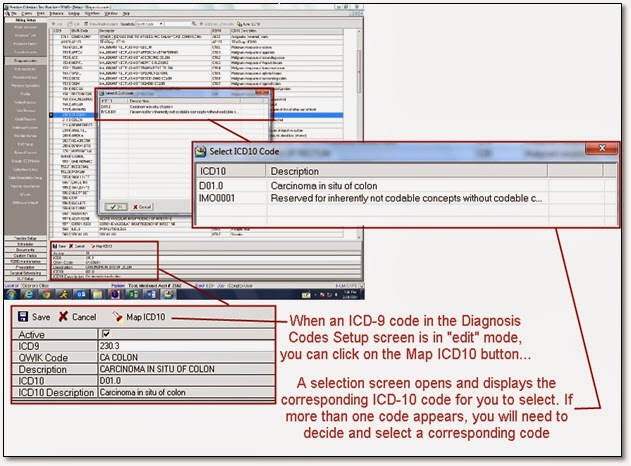

You may (or may not) need to create new entries for unmapped ICD10 codes.

The mapping process may also not return an ICD-10 response if there isn’t an available translation for the ICD-9 code.

You will want to use the most specific ICD-10 code for routine visits. Unfortunately, not all ICD-9 codes have a direct/single/one-to-one translation to ICD-10. That means mapping ICD-9 to the ICD-10 code may not be enough if the mapped ICD-10 code is not specific enough.

Step #3 – Setup a Carrier for ICD-10 Submission

The Insurance Carrier Setup screen contains all of the insurance carriers used by your practice. Although a carrier’s readiness for ICD-10 is expected as of Oct 1, the software allows the possibility of carrier exceptions. Each carrier’s edit screen contains a new checkbox that, when checked, will identify it as a carrier that you are ready to submit claims containing the new ICD-10 codes.


Step #4 – Enter an ICD-10 Start Date

The Practice Information screen has a new field at the bottom in which you can enter your practice’s ICD-10 Start Date. The date entered here is the earliest service date for which a file can contain claims with ICD-10 codes.


The date entered here will eventually be Oct 1, 2014, but you may want to use an earlier date for Clearinghouse testing purposes as discussed later in this document. 

Diagnosis Analysis Report

TCMS offers a preparatory report that will identify your most utilized ICD-9 codes within a service date span and their corresponding ICD10 code. This report will confirm that you have mapped your most common ICD-9 codes to ICD-10:


Testing With a Clearinghouse

To send a file for testing with your clearinghouse, all of the four preparation steps noted above must be performed.

TCMS will include the ICD-10 code(s) on claims if:

  • The Practice Default is activated/selected (Step 1), and…
  • The ICD-10 code exists and synced to the ICD-9 already on the claim (Step 2), and…
  • The carrier is set up for ICD-10 submission (Step 3), and…
  • The claim’s service date is after the ICD-10 Start Date (Step 4).

The clearinghouse will respond with a “999” confirmation that the file is acceptable but will not forward the claims to the payers for further adjudication or testing. An acceptable response confirms your ability to submit ICD-10 coded claims to the clearinghouse.


YOU CAN PERFORM ALL PREPATORY WORK WITHOUT AFFECTING YOUR CURRENT CLAIM ENTRIES OR SUBMISSIONS.  DO NOT WAIT FOR THE LAST MINUTE.


Wednesday, May 15, 2013

TCMS Version 4.8.4.1 –What’s New, Fixed, etc

“ERN Auto Writeoff” Feature is Now Available
This new Setup Screen feature, ERN Auto Writeoff, can be utilized to automatically write off an amount specifically identified within an electronic remittance advice (ERA) by a Claim Adjustment Reason Code. Currently, this is most useful for use because of the new 2% Medicare sequestration deductions that cannot be billed to the patient and needs to be written off. This feature will perform the write off for you automatically, and is reflected as usual in the history of the patient’s service line in the ledger.

What is “Sequestration?”
On Monday, April 1, a 2 percent across-the-board cut in Medicare provider payments took effect. All Medicare physician claims with a date of service on or after April 1 are subject to a 2 percent payment cut. The cut will be applied to the payment itself, not the underlying “allowed charge” in the Medicare fee schedule.

As a result, beneficiary copayments and deductibles will not change. In other words, the 2 percent cut is imposed only on the 80 percent of the allowed charge that a participating physician would receive directly from Medicare. The 20 percent copayment amount (and any deductible) that the physician collects from the patient will be based on the full allowed charge amount. The patient cannot be billed for the sequestered amount. In effect, the sequestered amount is to be “written off” by the provider.

Here is an example of the amount sequestered from a payment:
(Click Image to Enlarge)

How to set it up:
(Click Image to Enlarge)


Prescriptions now synced to Web services

All patient prescriptions, allergies and medications are now synchronized with corresponding Web services.

Monday, December 31, 2012

Criterions ICD-10 Readiness

The Criterions EHR adopted ICD-10 in 2012. The EHR stores ICD-10 coding with ICD-9 entries after every visit. Once ICD-10 goes into effect, planned for Oct 1, 2014, Criterions products will automatically send the ICD10 with the EDI claims.

EHR clients will have the capabilities of auto-mapping the ICD-9 to ICD-10 codes, with an exception list that can be manually resolved by the users.

TCMS clients, without the comprehensive and integrated Criterions EHR, will be able to manually enter the ICD-10 in the Diagnosis setup. Users will manually find the corresponding ICD-10 codes and put them in the setup.

For more information on ICD-10, please click on the following links:
(Clicking on any of these links will open the link in a new window)
CMS/Medicare ICD-10 Coding FAQ's
AMA Transaction Code Set Standards for ICD10-codes
AHIMA ICD-10

Friday, December 21, 2012

TCMS Version 4.8.3 – What’s New, What’s Fixed, etc

                ( any image can be enlarged by clicking on it)

This version includes version 4.8.2 – please update to 4.8.3

Procedure Code Financial Analysis report adjustment
When generating a Procedure Code Financial Analysis report, specifically by Insurance Types and including patient names, the report was not including services generated for now-inactive carriers... causing a noted difference between the detailed and the summarized versions of the report. This has now been corrected by including the services in the detailed report.
Document edits now display in preview immediately after saving
When editing a patient's document, the changes will now display in the preview portion of the screen immediately after saving (no longer need to refresh the screen).
Tickler System capacity increased
The Tickler System text box character capacity is now increased to accommodate up to 500 characters.
Worker’s Compensation form adjustment
The Worker’s Compensation form "C4.3" will now allow for the simultaneous selections of progress note fields 2A (scheduled loses) and 2B (non-scheduled losses).
A new field for Medicare Secondary Payor (MSP) Type identifier is now available
For claims billed electronically, the MSP insurance type code (submitted in loop 2000B within the SBR 05 segment) identifies the type of other insurance that is the basis for the beneficiary’s MSP status.
TCMS now has a new custom field named "Reason why Medicare is secondary" in the Patient Custom Field feature, located in the patient's Demographics screen. The electronic claim file builds the Medicare secondary insurance type code based on the custom field value entered here.
Here is a list of the MSP Provisions as provided by Medicare:

Correction made posting electronic United Healthcare secondary payments
United Healthcare secondary payments were sporadically posting as either GHI payments or as primary payments. This is now corrected and they will now post appropriately. 
Workflow Queue is now freeze-free
The Workflow queue was sometimes "freezing" in some situations after printing a document. This problem is now addressed and this feature will no longer freeze for the affected clients.
TCMS is now Press Ganey patient-survey-friendly
A CSV-file export of patient data can now be generated from the Scheduling module for submission to Press Ganey and for the purposes of client-specific patient surveys. Press Ganey collects the data and randomly determines which of the patients are surveyed. The use of this feature requires activation by Criterions. Once activated, a Press Ganey Format option appears in the export feature:

 A new ESB Queue User Right is available
There is now a new User Right which allows for the removal of entries from the Electronic Superbill(ESB) Queue feature. Prior to this version, any user with rights to the ESB Queue had the ability to remove entries from the ESB Queue. With this update, the User Right is selected by default so that the user can continue removing entries, but the right to do so can now be managed:
Patient Balance due amount is now displayed in the Patient Search screen
While searching for a patient within the Patient Search screen, in addition to the total account balance, you can now also see the "Patient Balance."  This will display the total balance due from the patient, based on all services with a balance that are due from "Self."
 Three changes are now in effect within the Provider Number Setup screen
1) When using the "Copy Provider Number" feature, the "Pay To" and the "Billing Address" fields will now also be copied;
2) When using the "Setup by Insurance Type" feature, the user can now also enter the "Pay To" and the "Billing Address" information;
3) While using either of these two features, no existing data will be removed.

TCMS now utilizes the latest version of PDF Creator v. 1.4.3
This version of TCMS distributes the latest PDF Creator installation files and will install them automatically while the user accesses the older version of PDF Creator.

Medicaid form adjustment made to the "Total" calculations
Under certain circumstances only, the "Total" amount field of the Medicaid form was not calculating correctly. This problem has now been addressed.

ERx import adjustment made to the incoming file's distribution
Under certain circumstances only, an eRx response was distributed to the user's desktop rather than the appropriately designated workstation's folder. This problem has now been addressed.

FaxQ now validates the required 10 byte format
A adjustment was made to the FaxQ internal table that will ensure all fax numbers are formatted to exactly 10 digits/bytes.
Corrective adjustment made to the Procedure Code Financial Analysis Report
While generating the Procedure Code Financial Analysis report, specifically for select insurance carriers, the report was not limited to the selected carriers. This problem has now been addressed.
Corrective printing adjustment made to the CMS-1500 form's anesthesia minutes
Under certain circumstances only, anesthesia minutes were not printing on the CMS-1500 form. This problem has now been addressed.

New User Rights "Limited Access" option is now available
In the User Right's User Setup screen for all users, there is now a new feature labeled "Limited Access" which will limit the user's access to only patients that the user is pre-selected as "authorized" to access (a feature that is available in the patient's Additional Information screen).

Corrective adjustment made to printing CMS-1500 (HCFA) Box 33 - uniformity rule
Under certain circumstances only, the Pay To Address printed in the CMS-1500 form's Box 33 varied from the uniformity rule observed electronically. This problem has now been addressed. To memorialize the rule:


Ability to filter by Procedure Group added to Claims Ledger 
A new filter option is now avvailable in a patient's Claims Ledger. Along with previously available claim filters by service date span, by carrier, and/or by location, the user can now also filter services by Procedure Group.

A prompt in eRx was not displaying
When a user (other than a physician) is using the eRx feature, a prompt is generated asking who the prescribing doctor (Master Physician) is. This prompt was not appearing in a recent version. This problem has now been addressed.

A new "Institutional" claim identifier is now available for Facilities
Facilities (in the Facility Setup screen) now have a checkbox available that, if checked, will identify all claims with that facility attached as Institutional claims and will be picked up when creating an "Institutional" EMC file.
Note that an Institutional-specific claim file must be created for such claims to be picked up... claims with an Institutional facility will not be picked up when creating an otherwise commercial EMC file.

A Documents Usage report is now available
A new report, the Document Usage report, is now available. This report offers a broad view of the Document Catagories and their total size (in MB's) and total number of Documents in each Category. The resulting report can be sorted in a number of ways, and can also be exported to an MS Excel file for further analysis.


This version also contains a few other minor bug fixes and improvements
- The Electronic Worker’s Compensation OPT/PT has been corrected to communicate with the FTP server for iHCFA.
- Confirmed appointments are included as Appointments made when generating a Scheduling Patient List.
- In the Documents module, the  the "appointment" merge fields will not regard the order they appear in within the document or the existence of past or future appointments.
- The "location" dropdown in the Daily Schedule report GUI is expanded to accomodate the display of longer location names.
- The "location" name displayed at the bottom-left corner of the TCMS splash screen is expanded to accomodate the display of longer location names.
- When multiple validation reports are uploaded together to TCMS, they will be loaded individually (which actually increases speed and helps to prevent error).
- Ticklers created without user-set delays will no longer wait for default time, and will generate when TCMS is opened by the user (this helps to prevent "ghost" ticklers).
- Checkouts in the Scheduler's ESB will generate the checked-out icon.
- Schedules and Resource Monitors will now update when schedule changes occur on the individual patient's Appointments screen.

 - end

Tuesday, December 18, 2012

TCMS Version 4.8.1 – What’s New, What’s Fixed, etc

(RE-POST FROM AUGUST 2012)

Collection Module error with Documents is fixed.
Some TCMS users were receiving an “EOF error” under certain conditions while printing Bulk Documents from within the Collection Module. This will no longer happen


Duplicate check number posting errors are now prevented
If two checks containing the same check number were posted, there was a possibility the funds would be drawn from the wrong check, causing a “negative” amount posted from the check.

A database trigger has now been enabled to ensure that this no longer occurs.

New notation added to the Daily Transaction report
Due to the nature of the Daily Transaction Report not showing inactive locations, or the user running the report not having user rights to a given location, we have added a notation at the bottom of the report to reflect the data that is used to generate the report.
The notation reads: “This report does not generate data from transactions performed in inactive locations.
This report will also not display data from transactions performed in locations for which that user does not have rights”.

Institutional Billing now available through TCMS’s Emdeon Claim Center
TCMS now offers Institutional Billing through the Emdeon Clearinghouse.

To accomplish this, place a checkmark on the new option in Practice Defaults Setup screen labeled “Send Institutional Claims to Emdeon”. Then, while creating the EMC file, select the “Institutional” option.

ERx files now save correctly to the intended (temp) folder
ERx files were inadvertently downloaded to the user’s desktop instead of a temp folder. This has been corrected.

A field in the Worker’s Comp HP1 for now populates appropriately
The Workers Comp HP1 form was not populating the “County” fields in all cases. This has now been corrected.

Printed HCFA/CMS-1500 forms will generate all modifiers
CPT/Claims that contained four modifiers were not generating all of the modifiers consistently.
The modifiers on the CMS-1500 form will now fill all the boxes when there are 4 modifiers for a given CPT.

Daily Transaction report with Custom Fields is now optimized
There was an issue with the Daily Transaction report in which the use of Custom Fields would cause the report to slow down. The database elements are now optimized for use with custom fields.

Workflow Queue error addressed
The Workflow Queue had an issue with the List View under some conditions in which it would not display the document, but rather generate and error,
“Archive does not exist”. This problem has now been addressed.

HCFA/CMS-1500 error addressed
Printing a HCFA/CMS-1500 was sometimes generating an error, stating “Error in Execute: 998 Failed to Retrieve Error Message from Print Engine.”
This was related to 5010 requirement changes. A database change has been put in place to ensure the error will no longer display.

Wednesday, July 11, 2012

835 (ERN) FILES FROM MEDICARE
Have you stopped receiving your 835 ERN files from Medicare? Most of our clients are not experiencing this problem.

If you stopped receiving them, you may have neglected to complete the 5010 production transition agreement. We provided instructions in January and completion was required before July 1st.

If your files have stopped coming, you need to complete the form. CLICK HERE and complete the 5010 Production Transition form online. It can take 5 to 10 business days to process the form. Once it is processed, you will receive a confirmation email from NGS. There is nothing else to set up or do once confirmed and you should start receiving your 835 ERN files thereafter.

Also note that, if you submit to multiple Medicare contractors (i.e., NGS and GHI Medicare), you will need to complete the form once for each contractor.

If you need any assistance completing the form, please feel free to call our Support Services Center at (516) 466-1942, extension 2. We can help complete the form with you.

Monday, July 9, 2012

TCMS Version 4.8.0 – What’s New, What’s Fixed, etc

Electronic Superbills are now removable from the ESB Queue
You can now remove an Electronic Superbill from the queue. There is sometimes a need to remove a claim from the ESB queue because the claim may have already been written manually, or because of a scheduling error that causes the ESB Queue to contain a duplicated claim. If needed, the claim can be removed from the ESB Queue by the user by Right-mouse clicking on the entry.

The Unit Analysis report can now be exported to a CSV/Excel file
There is now an Export feature available on the Unit Analysis Report. This will allow the user to export the data of the report to a CSV/Excel file that contains the data utilized from the database for the report. The exported file is created, by default, to your C drive and users familiar with Microsoft’s Excel software can tailor the data for more customized reporting.

Verbiage changed for an option while generating Electronic Statements
For the sake of clarity, there is a verbiage change in the Electronic Statements module’s selection screen. The second option shown will now state, “Print if (select number) statements have already been printed more that 30 days ago”. There is no change in actual functionality.

Two new fields added to the Electronic Statements EMC Setup
There are 2 changes made in the Setup -> EMC section for the Statements section.
- ANSI Format, where the user can mark it as “Y” if they are going to send ANSI formatted files.
- EMF login and Password fields to allow the user to enter those fields for transmitting those files.

Labeling changed in the Patient Search screen
There is a change in the labeling when searching for a patient (F10). For accuracy, the overall balance indicator’s label will now read “Account Balance” rather than Patient Balance. There is no change in actual functionality.

Time zone adjustments within Appointments properties are now in effect
Based on the settings on your workstation, the “time” utilized within the properties of appointments in the Open Scheduler will be specific to your time zone

Credit card payment processing can now span across services
When a credit card payment is accepted for processing, you can now post the payment to multiple services. To select multiple services, enter a checkmark in the selection boxes on the right-hand side of each service, then right-click over one of the services and process the payment.

To offer an example of how the payment will be posted: if you have four services and each has a balance of $100, and your total payment to be posted is $250; the first service will receive $100, the second service would receive $100, the third service will receive $50. In other words, the payment post to the services selected from the topmost service’s balance to the bottommost service until there are no more funds left to post.

Missing option is now available
A drop down box wherein the user can select between “fax” and “email” was missing on the MG 2 Worker’s Compensation form. It is now available.

Collection claims can now remain in collections when re-billed
In the past, a claim in the Collections module would automatically be removed from Collections when re-billed to a different carrier. The user is now given the option to keep a service in Collections after rebilling the claim to another carrier in the patient’s ledger.

Worker’s Compensation MG1 form now has a “comment” field available
There is a new comment field available for the MG1 form for Worker’s Compensation.

You can now process credit card payments within the Scheduler
There is a new option available while applying a patient’s copay from their appointment in the Scheduler. TCMS has added the ability to Process Credit Card directly from the scheduler

Worker’s comp has a new field available for the HP1 form
There is a new field on the Worker’s Compensation screen to include the name of the physician that rendered the first treatment. The selections available are sourced from the practice's Referring Doctor entries. This physician’s name will appear in the second page of the HP1 form.

Improvement in denoting an overbooked appointment
The Overbook check mark in the properties of an appointment that was overbooked was sometimes inaccurately reflected due to an internal flaw. The internal logic was re-written to ensure accuracy.

Printing error fixed
In previous version of TCMS, an error while printing LABS from the Workflow queue could occur under certain conditions. An internal trigger is now added to ensure against this error.