Please make sure your TCMS is on version 4.7.8 or 4.7.9 to improve connectivity to the Cloud.
Look for your current version while logging onto TCMS, or you may go to the "help" menu and select "about" . If you need assistance updating, please file an "eTrack" or call our Support Services team for assistance.
Tuesday, May 22, 2012
Wednesday, May 9, 2012
TCMS Version 4.7.9 – What’s New, What’s Fixed, etc
 |
| Click Image to Enlarge |
About TCMS-to-Go
When used, it extracts a complete dataset (excluding claim or financials) for each patient within the selection criteria. This extraction includes:
• All scheduled appointments within the selected date span
• Complete Demographics
• Insurance and scanned cards
• All stored documents
• Current Medications that were prescribed within TCMS eRx
Patient’s data can then be reviewed without a connection to a live system. Patients are either selected by their appointments or by searching and selecting their name. The complete content is stored on the local computer from which the utility was executed. The extracted data is password protected and fully encrypted in case the PC’s security is compromised.
What can TCMS-to-Go be used for?
The purpose of the TCMS2Go utility is to have local data viewing access in case of connectivity loss, with an internet based system or if an office based server were to fail. It must be run prior to any system failure. You cannot add to the system when viewing. Walk-in patients will not appear as it is based on scheduled patients only. It can also be used if a provider wished to extract their data for later reference, isolated from the original system.
The extraction utility is currently based on an appointment period only. Either select future period, to guard against connectivity loss or select the historic date span for the installed system for a complete patient population extraction.
Other important notes about TCMS-to-Go
• The process is for viewing data only.
• The longer the query period the longer it will take to run and extract the data.
• The PC will be inoperable for other activity during the extraction process.
• We cannot construct file data from any extracts as this program is for viewing patient data in a secure setting.
• There is no ability to create file data from this extraction.
New options available while exporting TCMS-to-Go
There are new options available in the TCMS-to-Go module while exporting the data, including cutoff dates for documents (base on creation date), and the option to export patient’s insurance cards if they are scanned in.
 |
| Click Image to Enlarge |
TCMS-to-Go exports can now include multiple resources.
 |
| Click Image to Enlarge |
TCMS-to-Go now allows user to search by account or patient’s last name
 |
| Click Image to Enlarge |
A Claim Center’s name was modified
The name of the Claim Center for DME Travelers has been modified to DME MAC to accommodate some recent changes made by the clearinghouse.
 |
| Click Image to Enlarge |
The label for “Scanned Images” in Documents Setup was modified
For clearer understanding, the document type in the Documents Setup section named “Scanned Images” has been modified to read, “TIF – Scanned or Faxed”.
 |
| Click Image to Enlarge |
There are now alternative fields available for “Billing” and “Pay to” addresses
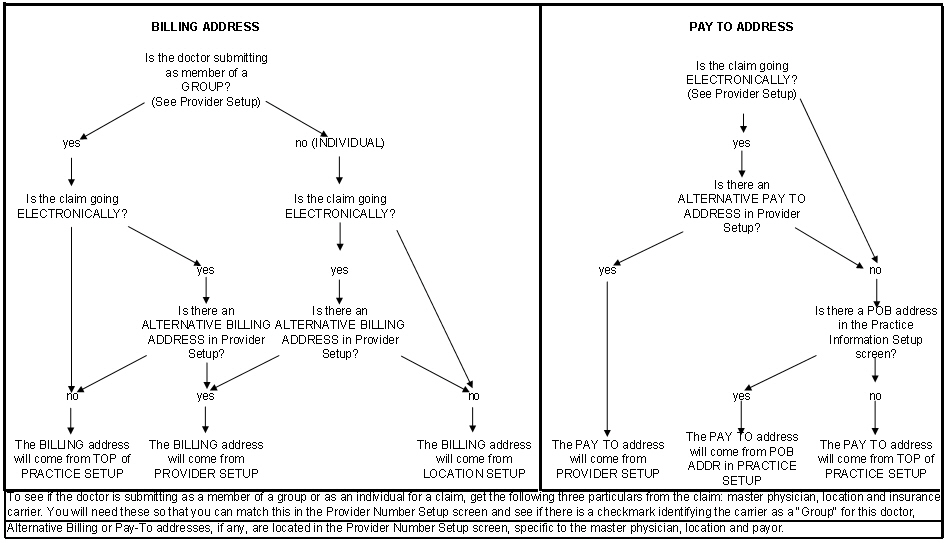
TCMS now offers additional fields in the Provider Number Setup screen that allow for alternative Billing and Pay-to addresses when submitting claims electronically. These fields are available specifically for use with any carrier/payer, provider and location combination. Address-related data in these fields will replace any existing Billing or Pay-to convention.
There is no change or action necessary to continue to bill the way you already are… these fields will serve as alternatives to what you may already be using. Selection of a Practice Default is necessary to activate this new feature.
 |
| Click Image to Enlarge |
Below is a schematic of the scripted building of Billing Address and of the Pay-to Address logic in TCMS. Please call us if you have any questions regarding these additions.
 |
| Click Image to Enlarge |
Bulk Eligibility is now fully functional in 5010 for CheckMedicare and Emdeon
Eligibility check for secondary and tertiary carriers is now available
There is a Practice Default that, when selected, will check a patient’s Secondary and Tertiary Insurances if they exist.
 |
| Click Image to Enlarge |
New Custom Field available for patients with End-Stage Renal Disease
There is a new Patient Custom Field. “Medicare Secondary End-Stage Renal Disease”. Setting this to “Yes” from the Patient’s Demographic screen will result in the building of a value of “13” in loop 2000B SBR.
 |
| Click Image to Enlarge |


Friday, April 13, 2012
TCMS Version 4.7.8 – What’s New, What’s Fixed, etc
A new option that prevents changing a charge amount while updating
Some background:
Prior to this version, when a service line is updated to a different carrier, and the fee schedule for the new carrier has a different charge amount in its fee schedule, the original charge amount changes to the new charge amount, unless:
(1) A payment was previously posted to the service
(2) A write-off was previously applied to the service
(3) The service was performed in a closed month
About this new option:
There is now a new option that the user can select while updating claims: “Do not update charge amount”.
If this new option is selected, and there is a difference between the charge amounts of the two fee schedules utilized, the charge amount of the service will not change when the service is updated to the new insurance profile.
Using the "Repeat Charge" feature with a future service date is now prevented
The "Repeat Charge" feature saves time when the same service needs to be re-written. But writing a service with a future DOS is not usually a desired option, and the “Repeat Charge” feature was inadvertently permitting this if the batch date was set with a date in the future. This is now no longer possible… if the user attempts to write a future service while using the future batch bate option, a message will be generated notifying the user that a future date of service cannot be used.
ERN Kicklist now includes Claim Adjustment codes
The ERN Kicklist report is an on-screen display that identifies the payments that were unable to be posted while posting payments automatically from an ERN/ERA. This report will now include the Claim Adjustment codes which can be used to sort/order the results of the report.
Unsent No Fault/Worker’s Comp Claims now included in report
The No Fault and Worker’s Compensation Claims now follow the same rules as all other claims when the Unsent Claims report is generated. Claims that have not yet been sent electronically (WC Claims can now be submitted electronically through iHCFA) or printed will appear on the Unsent Claims report.
Eligibility is now available for CheckMedicare as well as Emdeon
The Eligibility feature in TCMS offers eligibility and benefits verification with the largest group of commercial and government payers in the industry through which accurate eligibility information can be verified in real-time or high-volume batches. This feature, while working well using Emdeon, was recently not working with CheckMedicare and is now available .
ASP/Cloud clients can now select a preferred SS# default
There is a Practice Default that was already available to all clients, except for ASP/Cloud clients. The default is specific to retaining patient social security numbers in the patient demographics screens. This default is now also available to ASP clients.
Some background:
Prior to this version, when a service line is updated to a different carrier, and the fee schedule for the new carrier has a different charge amount in its fee schedule, the original charge amount changes to the new charge amount, unless:
(1) A payment was previously posted to the service
(2) A write-off was previously applied to the service
(3) The service was performed in a closed month
About this new option:
There is now a new option that the user can select while updating claims: “Do not update charge amount”.
If this new option is selected, and there is a difference between the charge amounts of the two fee schedules utilized, the charge amount of the service will not change when the service is updated to the new insurance profile.
Using the "Repeat Charge" feature with a future service date is now prevented
The "Repeat Charge" feature saves time when the same service needs to be re-written. But writing a service with a future DOS is not usually a desired option, and the “Repeat Charge” feature was inadvertently permitting this if the batch date was set with a date in the future. This is now no longer possible… if the user attempts to write a future service while using the future batch bate option, a message will be generated notifying the user that a future date of service cannot be used.
ERN Kicklist now includes Claim Adjustment codes
The ERN Kicklist report is an on-screen display that identifies the payments that were unable to be posted while posting payments automatically from an ERN/ERA. This report will now include the Claim Adjustment codes which can be used to sort/order the results of the report.
Unsent No Fault/Worker’s Comp Claims now included in report
The No Fault and Worker’s Compensation Claims now follow the same rules as all other claims when the Unsent Claims report is generated. Claims that have not yet been sent electronically (WC Claims can now be submitted electronically through iHCFA) or printed will appear on the Unsent Claims report.
Eligibility is now available for CheckMedicare as well as Emdeon
The Eligibility feature in TCMS offers eligibility and benefits verification with the largest group of commercial and government payers in the industry through which accurate eligibility information can be verified in real-time or high-volume batches. This feature, while working well using Emdeon, was recently not working with CheckMedicare and is now available .
ASP/Cloud clients can now select a preferred SS# default
There is a Practice Default that was already available to all clients, except for ASP/Cloud clients. The default is specific to retaining patient social security numbers in the patient demographics screens. This default is now also available to ASP clients.
Friday, March 16, 2012
TCMS Version 4.7.7 – What’s New, What’s Fixed, etc
The Collections Module has a handful of new enhancements and modifications:
In the Setup screen for the Collection Module, there are now new options to further define the criteria for moving Insurance-Due claims into Collections. The user is now able to set the minimum number of aging days based on service date in addition to transaction date.
On the “Move Claims” screen, the user will now be given the option to move claims by calculating the aging date from the service date or from the transaction date as in previous versions of TCMS.
Additionally, the Agent work screen will now display each individual claim assigned to the selected agent rather than displaying the information on an account level. This allows the agent to work their assigned claims directly from this screen and eliminates the need to switch between screens. The detail grid will now also include the “Transaction Aging Days”, “Service Aging Days”, and “Date Assigned” columns to allow the user further flexibility to sort claims as desired.
For Assigned and Worked claims, in addition to the existing ledger display at the bottom of the screen, new tabs have been added to give the user access to the Patient’s Demographic and Insurance information without having to switch screens or exit the Collection module.
If the user ‘Right Mouse’ clicks and selects to jump to the patient’s Ledger from the Agent work screen, it will bring the user to the actual claim. This is a big time saver as the user will not have to search through claims.
We have also added the “Agent Productivity Report” under the Collection reports menu.
This Report can be run for selected agents in a selected date span.
The Report can be run in Summary mode:
Or in Detail Mode:
Electronic Worker’s Comp is now updated with new iHCFA requirements
Electronic Worker’s Comp claim submissions, processed through the WCB certified clearinghouse iHCFA, are now updated to the latest compliance requirements.
No Fault claim form data adjustment
The No Fault claim form was only including the first claim modifier and cutting off any other existing modifier codes. The form will no longer cut off secondary modifiers when printed.
Workplace Health Statements now observe Practice PO Box addresses
The Workplace Health Statements will now utilize the Practice’s PO Box Pay-to address (if used for the practice in the Practice Setup screen).
Facilities can now be removed from claims by the user
In prior versions, the user was always able to change a claim’s facility from one to another; but there was a limitation on completely removing a facility altogether. The user can now remove a facility without the need to replace it with another.
The EMC Submissions report has 2 new indicators
The EMC Submissions report will now indicate if a claim has exceeded the Timely Filing Warning level assigned in the Insurance Carrier’s Setup screen; the report will also now indicate if a claim has exceeded the Timely Filing Allowance level, also assigned in the carrier’s setup screen.
A new option to claim acknowledgements
Until now, the user was unable to view the Medicaid 277 report, which offers information on claims that were rejected. There is a menu option available under the ‘Claims’ menu called ‘View Claim Acknowledgement’. Once launched, the user can select from downloaded 999 or 277CA files to view, save, or print.
In the Setup screen for the Collection Module, there are now new options to further define the criteria for moving Insurance-Due claims into Collections. The user is now able to set the minimum number of aging days based on service date in addition to transaction date.
 |
| Click Image to Enlarge |
 |
| Click Image to Enlarge |
 |
| Click Image to Enlarge |
 |
| Click Image to Enlarge |
 |
| Click Image to Enlarge |
 |
| Click Image to Enlarge |
 |
| Click Image to Enlarge |
The Report can be run in Summary mode:
 |
| Click Image to Enlarge |
Or in Detail Mode:
 |
| Click Image to Enlarge |
Electronic Worker’s Comp is now updated with new iHCFA requirements
Electronic Worker’s Comp claim submissions, processed through the WCB certified clearinghouse iHCFA, are now updated to the latest compliance requirements.
No Fault claim form data adjustment
The No Fault claim form was only including the first claim modifier and cutting off any other existing modifier codes. The form will no longer cut off secondary modifiers when printed.
Workplace Health Statements now observe Practice PO Box addresses
The Workplace Health Statements will now utilize the Practice’s PO Box Pay-to address (if used for the practice in the Practice Setup screen).
Facilities can now be removed from claims by the user
In prior versions, the user was always able to change a claim’s facility from one to another; but there was a limitation on completely removing a facility altogether. The user can now remove a facility without the need to replace it with another.
The EMC Submissions report has 2 new indicators
The EMC Submissions report will now indicate if a claim has exceeded the Timely Filing Warning level assigned in the Insurance Carrier’s Setup screen; the report will also now indicate if a claim has exceeded the Timely Filing Allowance level, also assigned in the carrier’s setup screen.
A new option to claim acknowledgements
Until now, the user was unable to view the Medicaid 277 report, which offers information on claims that were rejected. There is a menu option available under the ‘Claims’ menu called ‘View Claim Acknowledgement’. Once launched, the user can select from downloaded 999 or 277CA files to view, save, or print.
Wednesday, March 7, 2012
TCMS Version 4.7.6 – What’s New, What’s Fixed, etc
Introducing the new “Copay Analysis” Report
There is a new report under the “Scheduler Reports” section of TCMS, it is a Copay Analysis Report. The report compares “Copay” payments applied to the accounts of patients that were scheduled (within a specific date or date span) to their expected copay amount in the same patient’s Demographics screen. The report will then identify exact payment matches and payment exceptions (whether the patient paid more or less than the expected amount). The user can opt to only show exceptions, or limit by Resources, and an assortment of other options… including generating a report for a specific patient by account number.
The Unit Analysis Report is now a bit faster
The Unit Analysis report is now faster and offers better response times to accommodate all levels of Oracle databases.
Worker’s Comp Authorizations will all display
When selecting the “Show All” authorizations option in the Worker’s Comp Claim Edit screen, all available authorizations will now display (regardless of which insurance carrier generated the authorization). This is because, unlike medical claim authorizations, WC authorizations are often carried over to other payors and need to be selectable for any claims.
Zero payments will now post from ERN’s
When posting from an ERN, zero-dollar payments will now post to the patient’ claim as long as there is either a copay or deductible applied to the service.
There is a new report under the “Scheduler Reports” section of TCMS, it is a Copay Analysis Report. The report compares “Copay” payments applied to the accounts of patients that were scheduled (within a specific date or date span) to their expected copay amount in the same patient’s Demographics screen. The report will then identify exact payment matches and payment exceptions (whether the patient paid more or less than the expected amount). The user can opt to only show exceptions, or limit by Resources, and an assortment of other options… including generating a report for a specific patient by account number.
The Unit Analysis Report is now a bit faster
The Unit Analysis report is now faster and offers better response times to accommodate all levels of Oracle databases.
Worker’s Comp Authorizations will all display
When selecting the “Show All” authorizations option in the Worker’s Comp Claim Edit screen, all available authorizations will now display (regardless of which insurance carrier generated the authorization). This is because, unlike medical claim authorizations, WC authorizations are often carried over to other payors and need to be selectable for any claims.
Zero payments will now post from ERN’s
When posting from an ERN, zero-dollar payments will now post to the patient’ claim as long as there is either a copay or deductible applied to the service.
TCMS Version 4.7.4 – What’s New, What’s Fixed, etc
A new Practice Default available for Faxes
Until now, a document could only be faxed if it were digitally signed. We’ve added a new Practice Default that, when it is UNCHECKED, will allow users to fax documents that are not digitally signed.
Claim files removed properly after sending
When electronic claim files (EMC files) are generated for submissions to Emdeon or to McKesson, they are temporarily held in a file and are usually removed after the submission was completed. Recently, however, the files were not disappearing… this problem is now addressed. The EMC files in the folder will now be removed from the folder after they are submitted to the clearinghouse for both Emdeon and McKesson.
New Worker’s Comp form now available
For Workers Compensation, there is a new version of the C 4.3 form. It is identified by (1/12) at the bottom of the form.
* The Worker’s Compensation forms will now adhere to the Pay-To address if it is selected in the Practice Setup screen.
Appointment history will now print
Printing a patient’s appointment history was causing an error when the option to “Show cancelled appointments” was selected. This has now been addressed.
New 64-bit station Installer available
There is a new Installer for users that are utilizing 64-bit workstations that need to send and/or process claims electronically. The new Installer is available in the folder where the TCMS runtimes are located. It is called the “CriterionsEDIDownloaderx64Setup.msi”
Until now, a document could only be faxed if it were digitally signed. We’ve added a new Practice Default that, when it is UNCHECKED, will allow users to fax documents that are not digitally signed.
Claim files removed properly after sending
When electronic claim files (EMC files) are generated for submissions to Emdeon or to McKesson, they are temporarily held in a file and are usually removed after the submission was completed. Recently, however, the files were not disappearing… this problem is now addressed. The EMC files in the folder will now be removed from the folder after they are submitted to the clearinghouse for both Emdeon and McKesson.
New Worker’s Comp form now available
For Workers Compensation, there is a new version of the C 4.3 form. It is identified by (1/12) at the bottom of the form.
* The Worker’s Compensation forms will now adhere to the Pay-To address if it is selected in the Practice Setup screen.
Appointment history will now print
Printing a patient’s appointment history was causing an error when the option to “Show cancelled appointments” was selected. This has now been addressed.
New 64-bit station Installer available
There is a new Installer for users that are utilizing 64-bit workstations that need to send and/or process claims electronically. The new Installer is available in the folder where the TCMS runtimes are located. It is called the “CriterionsEDIDownloaderx64Setup.msi”
Friday, January 6, 2012
TCMS version 4.7.3 - What’s New, What’s Fixed, etc.
TEMPORARILY SUSPEND SENDING BCBS CLAIMS
MedXpress and BCBS were experiencing transmission irregularities for 4010 & 5010 Formats. We all understand the urgency… expect a correction shortly. We can notify all clients instantly through this messaging once this is addressed. Please do not call Criterions support for BCBS claims until there is notification that it has been corrected or we have provided instructions with this type of “Alert”. We will notify all clients when and how to resume BCBS submissions once we get notice from them.
MEDICARE HAS EXTENDED THE 4010 FORMAT THROUGH JAN 31
Although many clients are submitting 5010 Medicare formats without issue we have discovered irregularities related to Windows workstation configuration variables. If you experience 5010 submission errors, you can revert to the 4010 format as a temporary solution as we are working with those clients for a remedy. The selection is found under “File”, “Setup”, “Practice Setup”, “Practice Defaults” and remove the checkmark on the default labeled “Generate 5010 Claims” – this will permit you to generate a file in the older 4010 format.
The 5010 version has been re-released. Version 4.7.3 addresses the following irregularities discovered with the earlier release: Only update if this affects you.
CMS-1500 (HCFA) forms will now generate PO Box info if applicable
Box 33 on the CMS 1500 (HCFA) was not printing the PO BOX PAY TO address when the new PO Box feature became available and selected for the Practice (TCMS was printing the Practice Address). This issue is now addressed. When the PO Box feature in the TCMS Practice Information screen is utilized, TCMS will now print the PO Box “Pay To” address information in Box 33 of the HCFA.
Patient Statements will now generate PO Box info if applicable
Patient Statements were not printing the PO BOX PAY TO address when the new PO Box feature became available and selected for the Practice (TCMS was printing the Practice Address). This issue is now addressed. When the PO Box feature in the TCMS Practice Information screen is utilized, TCMS will now print the PO Box “Pay To” address information under the Practice Name on printed patient statements (both bulk printing and individual printing). This issue is also addressed when Electronic statement files are generated.
Creating an electronic file for individual/selected carriers
Creating a claim file for “Individual Insurance Carriers” was not excluding unselected carriers. This issue is now addressed… only the claims due from selected carriers will be included
Procedure Code Financial Analysis Report sort correction
The Procedure Code Financial Analysis Report was not printing in the correct sort order when a specific combination of selections was selected (include patient name and split by Insurance type/Carrier). The resulting sort order for this specific report was incorrect. This issue is now addressed.
Worker’s Comp “MG-2” form misspelling corrected
There was a misspelling on the MG-2 form that is now corrected.
MedXpress and BCBS were experiencing transmission irregularities for 4010 & 5010 Formats. We all understand the urgency… expect a correction shortly. We can notify all clients instantly through this messaging once this is addressed. Please do not call Criterions support for BCBS claims until there is notification that it has been corrected or we have provided instructions with this type of “Alert”. We will notify all clients when and how to resume BCBS submissions once we get notice from them.
MEDICARE HAS EXTENDED THE 4010 FORMAT THROUGH JAN 31
Although many clients are submitting 5010 Medicare formats without issue we have discovered irregularities related to Windows workstation configuration variables. If you experience 5010 submission errors, you can revert to the 4010 format as a temporary solution as we are working with those clients for a remedy. The selection is found under “File”, “Setup”, “Practice Setup”, “Practice Defaults” and remove the checkmark on the default labeled “Generate 5010 Claims” – this will permit you to generate a file in the older 4010 format.
The 5010 version has been re-released. Version 4.7.3 addresses the following irregularities discovered with the earlier release: Only update if this affects you.
CMS-1500 (HCFA) forms will now generate PO Box info if applicable
Box 33 on the CMS 1500 (HCFA) was not printing the PO BOX PAY TO address when the new PO Box feature became available and selected for the Practice (TCMS was printing the Practice Address). This issue is now addressed. When the PO Box feature in the TCMS Practice Information screen is utilized, TCMS will now print the PO Box “Pay To” address information in Box 33 of the HCFA.
Patient Statements will now generate PO Box info if applicable
Patient Statements were not printing the PO BOX PAY TO address when the new PO Box feature became available and selected for the Practice (TCMS was printing the Practice Address). This issue is now addressed. When the PO Box feature in the TCMS Practice Information screen is utilized, TCMS will now print the PO Box “Pay To” address information under the Practice Name on printed patient statements (both bulk printing and individual printing). This issue is also addressed when Electronic statement files are generated.
Creating an electronic file for individual/selected carriers
Creating a claim file for “Individual Insurance Carriers” was not excluding unselected carriers. This issue is now addressed… only the claims due from selected carriers will be included
Procedure Code Financial Analysis Report sort correction
The Procedure Code Financial Analysis Report was not printing in the correct sort order when a specific combination of selections was selected (include patient name and split by Insurance type/Carrier). The resulting sort order for this specific report was incorrect. This issue is now addressed.
Worker’s Comp “MG-2” form misspelling corrected
There was a misspelling on the MG-2 form that is now corrected.
Friday, December 30, 2011
The 5010 TCMS Version Is Re-Released
Identified as TCMS version 4.7.2, it addresses the irregularities found within the earlier release.
Please follow the previous update instructions.
Thank you for your patience.
Please follow the previous update instructions.
Thank you for your patience.
Thursday, December 22, 2011
5010, TCMS v. 4.7.1, Is Now Available
This version has the required claim change beginning January 1, 2012.
All current electronic claims are sent in a “4010-Format”. Effective January 1st 2012, the 4010 will be replaced by the “5010-Format.” The “5010-Format” allows for faster and clearer communication of eligibility and payment status.
Has the TCMS 5010-Format been tested?
Criterions is certified by Claredi, NGS/Medicare, NJ Medicare, Emdeon and McKesson for the “5010-Format”. Claredi is the gold standard for national uniformity for electronic claims. Our participation was optional but done to ensure that your file submissions will be successful.
Do practices using TCMS need to send TEST files?
Agreements with Emdeon, McKesson, NGS/Medicare, NJ Highmark Medicare, Connecticut Medicare, Empire BCBS, North Carolina BCBS and NY Medicaid have exempted Criterions submitters from sending TEST claim files.
If you wish to submit a TEST file (optional in most instances) to any Claim Center, please read below. Please realize that there is no need or requirement to send a TEST file or to edit these settings to begin submitting 5010-Format claim files in PRODUCTION.
What are the TCMS settings that affect the format of a generated 5010-Format file?
There are only two settings in TCMS that will affect the format of a file:
(a) Generating a 5010-Format file: There is a new Practice Default labeled “Generate 5010 Claims” that is ALREADY selected when you update to TCMS version 4.7.1. When this option is selected, claim files are created in the new 5010-Format; conversely, when it is not selected, claim files are created in the older 4010-Format.
 |
| Click Image to Enlarge |
(b) Generating a TEST claim file: Each Claim Center in the EMC Setup screen contains a field labeled “ISA15_5010” that ALREADY contains a “P” when you update to version 4.7.1. The “P” will generate the Claim Center’s file in PRODUCTION mode. Conversely, a “T” will generate a Claim Center’s file in TEST mode.
What must a Practice do before sending claims as usual in 5010-Format?
Prior to submitting any claims in the new 5010-Format, these steps must be performed:
Step 1 – Go to your Practice Information screen and make sure there is a nine-digit zip-code in place for the Practice.
Step 2 – FOR P.O. BOX PAY-TO ADDRESSES ONLY:
The Practice Address cannot be a PO Box address; it must be a physical street address. If your Practice utilizes a PO Box as a pay-to address, place a check-mark in the “Pay-to-address (PO Box address)” field at the bottom of the Practice Information screen and proceed to enter the PO Box Address information.
Step 3 – Go to each Facility in your Practice and make sure there is a nine-digit zip-code in place for each Facility.
Step 4 - Install the new MSI on any workstation that will be used to create EMC files or to post ERN payments. This install is VERY EASY for you to do yourself and we will provide you with a guide in a TCMS Alert on Friday 12/23.
Are there any new agreements required by NGS or NY Medicaid?
Yes:
FOR NGS/MEDICARE SUBMITTERS ONLY:
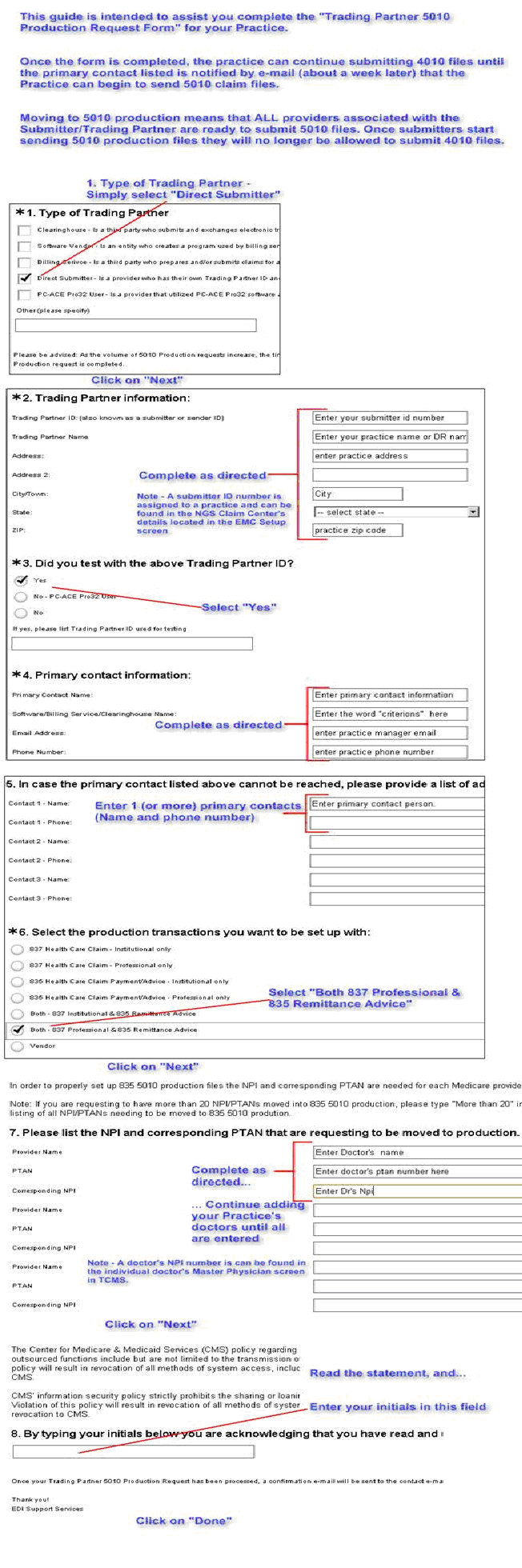
A practice can submit claims in the new 5010 format immediately. However, NGS requires that you complete a detailed online agreement within the next few months (click here for the application). We are also providing you with a guide (click here for a step-by-step GUIDE to the application; click the guide to enlarge) intended to assist you in completing this agreement. Once this agreement is completed, the primary contact that you list within the agreement will be notified by e-mail (about a week later) with a confirmation that the agreement was processed by NGS. It is imperative that the Practice completes this agreement to avoid recertification next year.
FOR EMEDNY SUBMITTERS ONLY:
EMedNY requires that, if you want to receive the NY Medicaid remittance advice, you complete an “Electronic Remittance Request Form” (click here for the NY Medicaid application). The form can be completed and mailed, faxed or emailed to Computer Sciences Corporation (details in the form). Be sure to complete the form completely to avoid delays.
Tuesday, December 6, 2011
5010 Format Progress ALERT
As you may or may not know:
We have successfully completed and passed all Vendor-required testing. TCMS version 4.7.1 is certified by Claredi, NGS, NJ Medicare, Emdeon and McKesson for the “5010 Format”. Claredi is the gold standard for national uniformity for electronic claims. Our participation in this optional certification further insures that your 5010 submissions will be successful.
When will the new version become available?
TCMS version 4.7.1 is planned to be released by December 15th (Update: Currently planned for December 21st). Its actual release date has been fluid as we finalize client’s responsibilities for testing, if at all necessary. We are working aggressively with our clearinghouses and claim gateways making every effort to reduce or eliminate your requirements. Here is a status on our efforts:
- All electronic claims are currently sent in a “4010 format”.
- Effective January 1st 2012, the 4010 will be replaced by the “5010 format.”
- The “5010 format” allows for faster and clearer communication of eligibility and payment status. The government has legislated this sweeping change.
We have successfully completed and passed all Vendor-required testing. TCMS version 4.7.1 is certified by Claredi, NGS, NJ Medicare, Emdeon and McKesson for the “5010 Format”. Claredi is the gold standard for national uniformity for electronic claims. Our participation in this optional certification further insures that your 5010 submissions will be successful.
When will the new version become available?
TCMS version 4.7.1 is planned to be released by December 15th (Update: Currently planned for December 21st). Its actual release date has been fluid as we finalize client’s responsibilities for testing, if at all necessary. We are working aggressively with our clearinghouses and claim gateways making every effort to reduce or eliminate your requirements. Here is a status on our efforts:
- Your requirement to submit a 5010 test file to Emdeon is no longer required.
- Your requirement to submit a 5010 test file to McKesson is no longer required.
- Your requirement to complete any 5010 paperwork for either Emdeon or McKesson is no longer required.
- Your requirement to submit a test file to NGS/Medicare requirement is pending. We are working with MedXpress and NGS to have this requirement eliminated however their confirmation is not expected till later this month.
Subscribe to:
Posts (Atom)